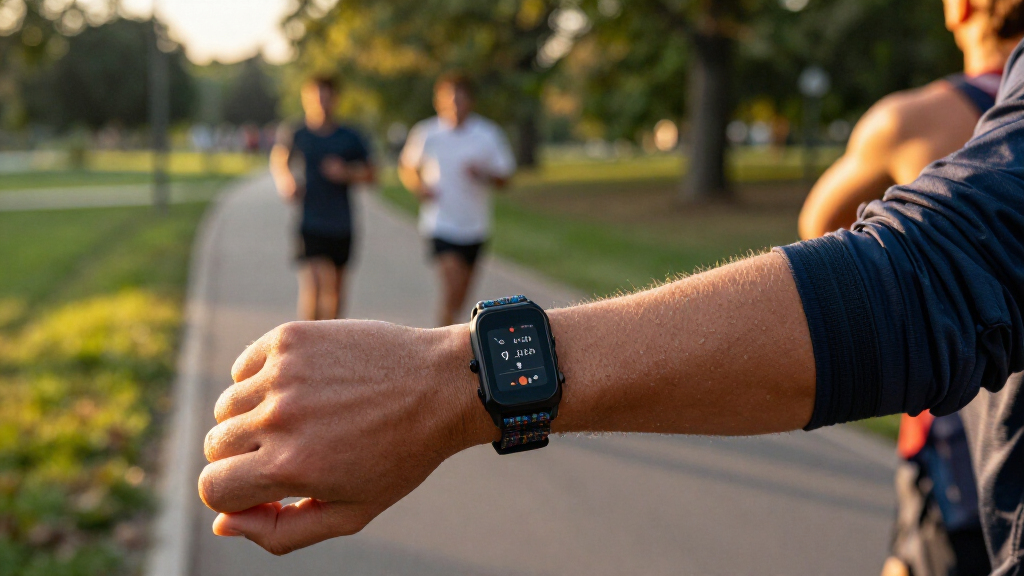
Set up your smart fitness tracker so it can record your activity, display notifications, and sync data with its phone app. This beginner guide is for anyone using a new tracker or setting one up again after a reset. You will need the tracker, a compatible phone, and the account or app required by its manufacturer. Allow about 30-60 minutes for setup, then wear it regularly for several days to learn how its readings and features work.

Get workout gear delivered free with Prime
- Fast, free delivery on millions of items
- Prime Video, Amazon Music and more included
- Member-only deals all year
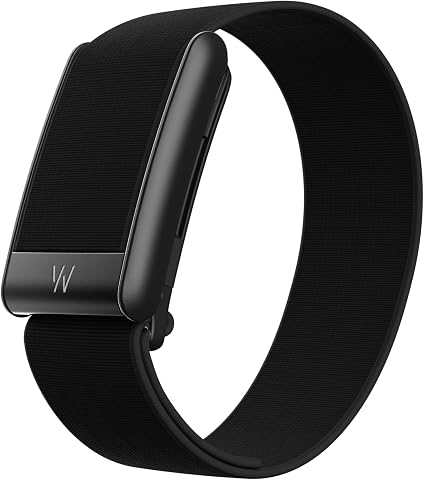
WHOOP 5.0 Screenless Fitness Health Sleep Wearable – 12-Month Membership
- ✔ Membership: 12 months of WHOOP One included
- ✔ Battery life: 14+ days
- ✔ Water resistance: IP68, up to 10 meters for 2 hours

Ultra Slim Fitness Tracker Smart Band with Heart Rate, Blood Oxygen, HRV, Stress & Sleep Monitoring, 10 ATM Waterproof, 100 Sport…
- ✔ Brand and model: ZiCOWAY H31
- ✔ Thickness: 2.6 mm
- ✔ Display: 0.49-inch OLED touchscreen
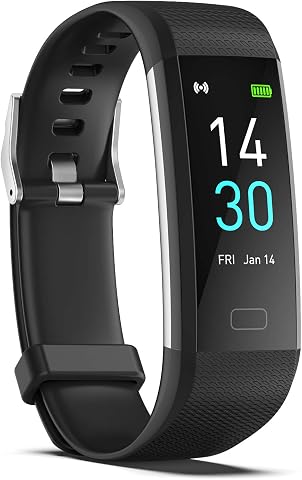
ENGERWALL Fitness Tracker with Heart Rate, Blood Pressure & Sleep Monitor – IP68 Waterproof Slim Band
- ✔ Brand and model: ENGERWALL S5-Black
- ✔ Battery life: 5–7 days
- ✔ Charging: Built-in USB-A connector
Difficulty: Beginner | Time: 30-60 minutes for setup; several days to learn your usual readings
What You’ll Need
Tools & Materials:
- Smart fitness tracker and its charging cable or dock
- Compatible smartphone or tablet
- Tracker manufacturer’s companion app
- Wi-Fi or mobile data for app setup and syncing
- Account login details, if the app requires an account
Knowledge:
- Basic ability to install an app and use Bluetooth settings
- Your usual waking and sleeping schedule, if you plan to use sleep tracking
- A general idea of your activity goals, such as daily steps or exercise minutes
Check the tracker’s packaging or manufacturer support page for phone compatibility, app requirements, and charging instructions. Charge the tracker before pairing; a low battery can interrupt setup. Health and fitness readings are estimates for general information, not a diagnosis or substitute for professional medical advice.
WHOOP 5.0 Screenless Fitness Health Sleep Wearable – 12-Month Membership
The WHOOP 5.0 is the most focused tracker here for people who want to connect sleep, recovery and training load over time. It monitors heart rate, HRV, respiratory rate, sleep stages, strain and recovery, with AI-driven coaching through its platform. That emphasis gives it a different job from the ZiCOWAY and ENGERWALL bands: instead of making quick readings and notifications central, WHOOP is built around interpreting patterns and helping us shape routines.Its screenless design can be appealing if we want a low-profile band for overnight wear, and the stated 14-plus-day battery life means fewer charging interruptions than the ENGERWALL’s five-to-seven-day estimate. The tradeoff is that there is no on-wrist display for live feedback. We also need to account for the membership: the included year provides an initial period with the platform, but continued use requires a subscription. Compared with ZiCOWAY’s small touchscreen and free companion app, WHOOP asks us to commit more to its app-based coaching approach.
Pros:
- Tracks sleep stages, strain, recovery, HRV and other measures in one platform.
- Screenless band supports a low-profile overnight-wear experience.
- Stated battery life is 14-plus days.
- Includes a 12-month WHOOP One membership.
Cons:
- Continued platform use requires a membership after the included 12 months.
- No display means stats and real-time feedback are not available on the wrist.
- Basic corded charger is included; wireless charging requires an optional accessory.
Best for: People who want detailed sleep, recovery and training-trend tracking in a screenless band and are comfortable using a membership-based platform.
Not ideal for: Buyers who want visible on-wrist stats, a tracker that works without an ongoing membership, or quick glanceable workout feedback.
Bottom line: We rank WHOOP first for buyers who value recovery and sleep insights above a display and accept the continuing membership requirement.
“We rank WHOOP first for buyers who value recovery and sleep insights above a display and accept the continuing membership requirement.”
Ultra Slim Fitness Tracker Smart Band with Heart Rate, Blood Oxygen, HRV, Stress & Sleep Monitoring, 10 ATM Waterproof, 100 Sport…
The ZiCOWAY H31 has the broadest mix of visible convenience and activity options in this group. Its stated 2.6 mm thickness and 0.49-inch OLED touchscreen make it a compact alternative to WHOOP: we can glance at information on the band without relying entirely on the app. It also lists heart rate, blood oxygen, HRV, stress and sleep monitoring, plus 100 sport modes, giving it more activity variety than ENGERWALL’s 16 modes.The 10 ATM water-resistance rating and included silicone and Milanese bands add flexibility for swimming, workouts and different daily settings. Its stated 12-day battery life sits between WHOOP’s longer interval and ENGERWALL’s shorter one. We should keep one limitation in mind for outdoor exercise: there is no built-in GPS, so accurate route and distance tracking depends on a connected phone. That makes it less self-contained than a GPS-equipped sports watch, while its free companion app avoids WHOOP’s membership commitment.
Pros:
- Very slim stated profile with a 0.49-inch OLED touchscreen.
- Lists 100 sports modes and 10 ATM water resistance.
- Includes silicone and Milanese bands for different settings.
- Free companion app and stated 12-day battery life.
Cons:
- No built-in GPS for independent outdoor distance tracking.
- Remote camera control depends on a compatible phone and app.
- The small display may be less useful for detailed workout information than a larger watch.
Best for: Buyers who want a slim band with a small display, multiple band styles, broad sport-mode selection and a stated 10 ATM rating.
Not ideal for: Runners or cyclists who want independent GPS tracking, or buyers who prefer a screenless wearable centered on recovery coaching.
Bottom line: We recommend ZiCOWAY for a compact, display-equipped tracker with versatile water and activity features, provided phone-dependent GPS is acceptable.
“We recommend ZiCOWAY for a compact, display-equipped tracker with versatile water and activity features, provided phone-dependent GPS is acceptable.”
ENGERWALL Fitness Tracker with Heart Rate, Blood Pressure & Sleep Monitor – IP68 Waterproof Slim Band
The ENGERWALL S5 suits buyers who want a slim band for basic activity tracking and a range of listed health readings. It records steps, distance, calories, heart rate, blood oxygen and body temperature, and its Runmefit app provides sleep analysis and notifications. The supplied description also lists blood pressure monitoring, which must be enabled in the app. For everyday movement and a simple view of routines, that coverage may be enough without stepping into WHOOP’s more recovery-focused platform.Compared with ZiCOWAY, ENGERWALL has a much shorter list of sport modes—16 rather than 100—and a shorter stated battery window of five to seven days. Its built-in USB-A connector removes the need for a separate cable, but it also means we need access to a compatible USB-A port to charge it. The IP68 rating supports everyday water exposure and swimming as described, though the guidance rules out prolonged hot baths and sauna use. This is the most basic choice in the lineup, and its appeal depends on valuing simple activity coverage over richer workout selection or longer time between charges.
Pros:
- Tracks steps, distance, calories, heart rate and sleep through the companion app.
- Lists blood oxygen, blood pressure and body temperature readings.
- Slim band with IP68 water resistance for daily wear and swimming.
- Built-in USB-A connector avoids carrying a separate charging cable.
Cons:
- Five-to-seven-day battery life is shorter than both other listed options.
- Only 16 sport modes, compared with ZiCOWAY’s 100.
- Blood pressure monitoring requires enabling the feature in the app.
Best for: People who want a slim daily band for steps, sleep and common health readings, including users who prefer direct USB-A charging.
Not ideal for: Training-focused buyers who want many sport modes, a longer battery interval, or the more developed recovery tracking offered by WHOOP.
Bottom line: We see ENGERWALL as a straightforward daily tracker for buyers who can live with fewer sport options and more frequent charging.
“We see ENGERWALL as a straightforward daily tracker for buyers who can live with fewer sport options and more frequent charging.”
As an Amazon Associate we earn from qualifying purchases.
Before You Start
Keep the tracker and phone close together during pairing. Turn on Bluetooth, and allow the companion app to use Bluetooth and notifications if you want those features. Some models also request location access for GPS, weather, or nearby-device functions. Review each permission prompt and grant only the access needed for the features you plan to use. If the tracker was previously paired to another phone, remove that old connection or follow the manufacturer’s transfer instructions before starting.
Step-by-Step Instructions
Step 1: Charge and inspect the tracker
Connect the tracker to its supplied charger and leave it charging until the screen or companion app shows a useful battery level. Check that the band closes securely and that the charging contacts are clean and dry. Read the quick-start instructions for any model-specific button or touch-screen controls.
Tip:Use the supplied charger when possible. A cable that fits physically may still charge unreliably if it is not designed for your model.
Check: The tracker turns on, responds to its controls, and shows a battery indicator.
Step 2: Install the companion app
Open the official app store on your phone, find the app named by the tracker manufacturer, and install it. Check the developer name before downloading so you do not choose an unrelated app. Open the app and sign in or create an account if prompted. Enter accurate profile details, especially age, height, and weight, because some estimates use them.
Tip:If you do not want a particular data type included in your account, check the app’s privacy and data-sharing settings before continuing.
Check: The app opens to a setup screen or device dashboard without an installation or sign-in error.
Step 3: Pair the tracker with your phone
Follow the app’s add-device or pair-device instructions. Select your tracker model and confirm the pairing request on both the phone and tracker if a code appears. Keep the two devices nearby until the app reports that pairing is complete. Pair from inside the manufacturer’s app unless its instructions specifically tell you to use the phone’s Bluetooth menu.
Tip:If the tracker does not appear, keep it on its charger, turn Bluetooth off and on, and try the app’s search again. Avoid starting several pairing attempts at once.
Check: The app shows the tracker as connected and displays its battery level or current activity data.
Step 4: Choose the features and permissions you want
In the app, review the setup choices for notifications, health measurements, location, and data sharing. Turn on the features you intend to use and grant their requested phone permissions. Set a PIN or wrist lock if your model offers one and you want to prevent accidental input. You can usually change these choices later in the app or phone settings.
Tip:Allow notification access only if you want alerts on your wrist. Too many alerts can distract you and shorten battery life.
Check: The app shows your selected features as active, and it does not display a pending permission request for a feature you intend to use.
Step 5: Fit the band and set your preferences
Wear the tracker on the wrist recommended by its manufacturer, usually just above the wrist bone. Fasten it so the sensor stays against your skin without pinching or leaving a deep mark. In the app, choose the correct wrist and handedness if those settings are available. Set your time format, measurement units, and preferred display face.
Tip:For exercise readings, the band may need to sit slightly more snugly than it does during everyday wear. Loosen it again if your skin becomes irritated or your hand feels numb.
Check: The tracker sits flat, stays in place as you move, and shows the correct time and display preferences.
Step 6: Set activity and health options
Open the app’s goals or health settings. Choose a realistic step, movement, or exercise goal based on your current routine; you can adjust it after observing a week of data. Set your usual sleep and wake times if the tracker uses them for sleep reports. Review heart-rate, blood-oxygen, or other measurement options and turn on only the readings you want to collect.
Tip:Do not treat a goal or estimated reading as medical advice. If a measurement concerns you, check it with an appropriate health professional or a device intended for clinical use.
Check: Your chosen goals and schedule appear in the app, and the tracker displays the activity or health tiles you enabled.
Step 7: Check syncing and notifications
Keep the tracker near your phone and open the app to trigger a sync. If you want call or message alerts, send a test notification from another device or ask someone to call. Check that the alert appears on the tracker. If you use phone GPS for outdoor workouts, confirm that the app has the needed location permission and that your phone can access location services.
Tip:Some trackers sync automatically in the background, while others sync when you open the app. Follow the instructions for your model before judging a brief delay.
Check: The app shows recent data from the tracker, and any test alert you enabled appears on your wrist.
Step 8: Wear the tracker and review your first results
Wear the tracker during your normal day, and start a workout manually when your model requires it. At the end of the day, open the app and check steps, activity time, battery use, and sync status. Wear it overnight only if you want sleep data and the band feels comfortable. Compare several days of readings before changing your goals or drawing conclusions about patterns.
Tip:Take the tracker off to clean and dry the band and the skin underneath, especially after sweating or swimming. Check the device’s water-resistance rating before exposing it to water.
Check: The app contains a recent activity record, the tracker remains connected or syncs when opened, and its battery lasts as expected for your model and settings.
Common Mistakes to Avoid
- Pairing through the phone’s Bluetooth menu before starting setup in the app. — Begin pairing from the manufacturer’s app unless its instructions direct you elsewhere. If an incomplete pairing already exists, remove it from Bluetooth settings and restart the app’s pairing process.
- Wearing the band too loosely during activity. — Position the sensor flat against your skin and adjust the band so it does not slide around. It should remain comfortable and should not restrict circulation.
- Setting an aggressive goal before seeing a normal week of activity. — Start with a goal that fits your current routine. Review several days of records and adjust in small steps.
- Assuming missing data means the tracker is broken. — Open the app near the tracker, check its battery and connection status, and confirm that the relevant tracking feature is enabled.
Troubleshooting
Problem: The app cannot find the tracker.
Solution: Charge and wake the tracker, move it close to the phone, and confirm Bluetooth is on. Close and reopen the app, then retry pairing from its add-device screen. Remove an old pairing from the previous phone if the tracker was already in use.
Problem: The tracker pairs but the app shows no new data.
Solution: Open the app with the tracker nearby and wait for a sync. Check that the tracker has battery power and that the phone permits the app to run Bluetooth activity. Restart both devices if the connection remains stale, then consult the model’s sync instructions.
Problem: Heart-rate or workout readings look inconsistent.
Solution: Move the tracker slightly above the wrist bone and secure the band so the sensor touches skin. Clean the sensor, warm up if your hands are cold, and start the workout mode if required. Motion, fit, skin contact, and the tracker’s design can affect estimates.
Problem: Notifications do not appear on the tracker.
Solution: Check notification access in both the companion app and phone settings. Confirm that alerts are enabled for the specific apps you want, that do-not-disturb settings are not blocking them, and that the tracker is connected.
What Success Looks Like
Your tracker is charged, paired with the correct phone, and visible in its companion app. The band fits comfortably, your selected goals and features are active, and the app can display recent activity after a sync. If you enabled notifications, a test alert reaches the tracker. After several days of wear, you can find daily activity records and understand when the app last synced.
Next Steps
Review your activity and battery use after the first week, then adjust goals or notifications to fit your routine. Keep the app and tracker firmware updated through the manufacturer’s normal update process. Clean and dry the band regularly, inspect it for wear, and recharge it before the battery runs low. Recheck settings after changing phones, reinstalling the app, or resetting the tracker. Contact the manufacturer if pairing, charging, or syncing problems continue after its model-specific troubleshooting steps.
Frequently Asked Questions
Do I need to keep my phone with me for the tracker to count steps?
Many trackers can count steps on their own and sync them later, but features such as GPS routes, live notifications, or connected workouts may need the phone nearby. Check your model’s instructions for which features work independently.
How tight should a fitness tracker be?
It should stay in place with the sensor touching your skin, without pinching, leaving a deep mark, or making your hand numb. You may need a snugger fit for exercise readings, then a looser fit for comfort afterward.
Can I wear the tracker while sleeping?
Most models with sleep tracking are designed to be worn overnight, but comfort and battery life vary. Check your model’s guidance, keep the band clean and dry, and remove it if it irritates your skin.
Why do my tracker readings differ from my phone or another device?
Devices can use different sensors, algorithms, and wear positions, so steps, calories, heart rate, and sleep estimates may not match. Use one device consistently to follow general patterns, and ask a health professional about medical concerns.
How often should I sync the tracker?
Many models sync in the background or when you open the companion app. Open the app with the tracker nearby at least when you want to review current records, and check the manufacturer’s guidance for how much unsynced data the device can store.